With Release 6, we are restructuring our licensing model: Starting with this version, a general software license forms the basis for using the software. It is required in addition to your existing feature licenses. In this guide, you’ll learn which licenses you need for your setup and how to activate them step by step.
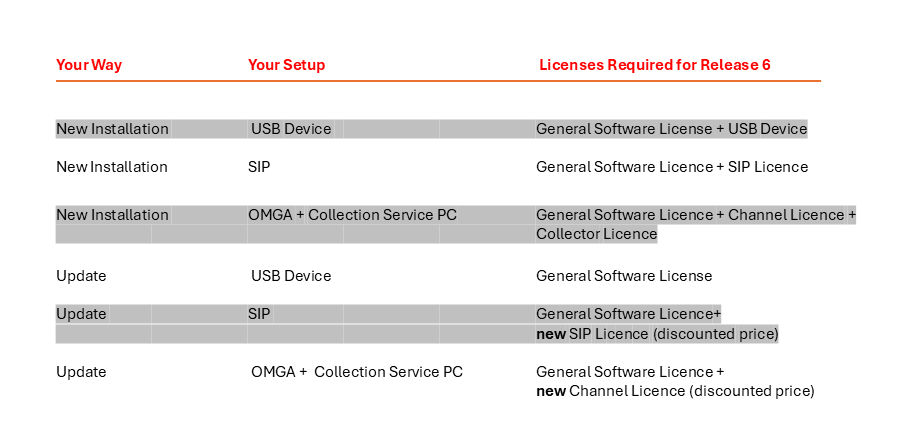
Two types of licenses - Here's how the system works
To help you keep an overview, we make the following distinctions:
General Software License (new as of Release 6) - the base license that is activated on every system on which the software runs. Without it, Release 6 will not start.
- Feature licenses - unlock the actual recording functionality, such as for USB, SIP, recording channels, or the collection service.
Flexible and efficient Solution for Call Recording
Our call recording solution is available for a wide variety of use cases. Here, we explain what you need to keep in mind when updating to Version 6.
Note: For technical support, please log in to the Service Portal, where you can activate your license to access all of the software's features.
If you need help: Go to “Technical Support” in the menu. Enter your support number and your contact email address there. Describe your issue as precisely as possible so that we can help you as best as we can.
Update release 6
Are you already using the software and want to upgrade to Release 6? In that case, you generally only need the new general software license—and then you’ll need to reactivate the licenses.
Why is that? With Release 6, the licensing model has changed; software-based feature licenses (SIP, channels, collection service) are issued as new licenses during the update—at a discounted rate for you. Hardware-based licenses, such as the USB device, on the other hand, do not require a new license; they simply need the new software license to be operational again.

Please contact me.